
Sunbot Labs project · client portal

HarborPoint Client Portal

HarborPoint creates a coordinated client and staff experience across project status, file sharing, service requests, invoices, and communication.

Product overview

HarborPoint Client Portal at a glance

A visual introduction to the main workflow, core features, and interface.

HarborPoint Client Portal at a glance poster

Project preview

Continue through the interface guide below to see how the workflow and key screens connect.

Client work is difficult to follow across disconnected channels

Clients often rely on separate email threads for project updates, documents, change requests, invoices, and questions. HarborPoint brings those interactions into a shared workspace so clients can find current information and staff can see what needs review.

A shared workspace for clients and staff

The portal experience includes distinct client and staff views, project details, a document library, request tracking, invoice status, message threads, staff queues, client management, and a responsive mobile workspace.

Project communication and self-service in one place

  • Move between client and staff perspectives to understand the full service workflow
  • Review projects, files, requests, invoices, and messages from one account workspace
  • Create and follow requests with visible priority, ownership, status, history, and next actions
  • Give staff a consolidated view of client activity, workload, pending files, and open requests
  • Filter records by status and move directly into the item that needs attention
  • Provide a focused mobile client experience without reproducing the full administrative interface

Inside the application

Two views of the same client workflow

Clients can find project information and submit requests in one view, while staff can review files, workload, account activity, and follow-up in another.

Client Workspace

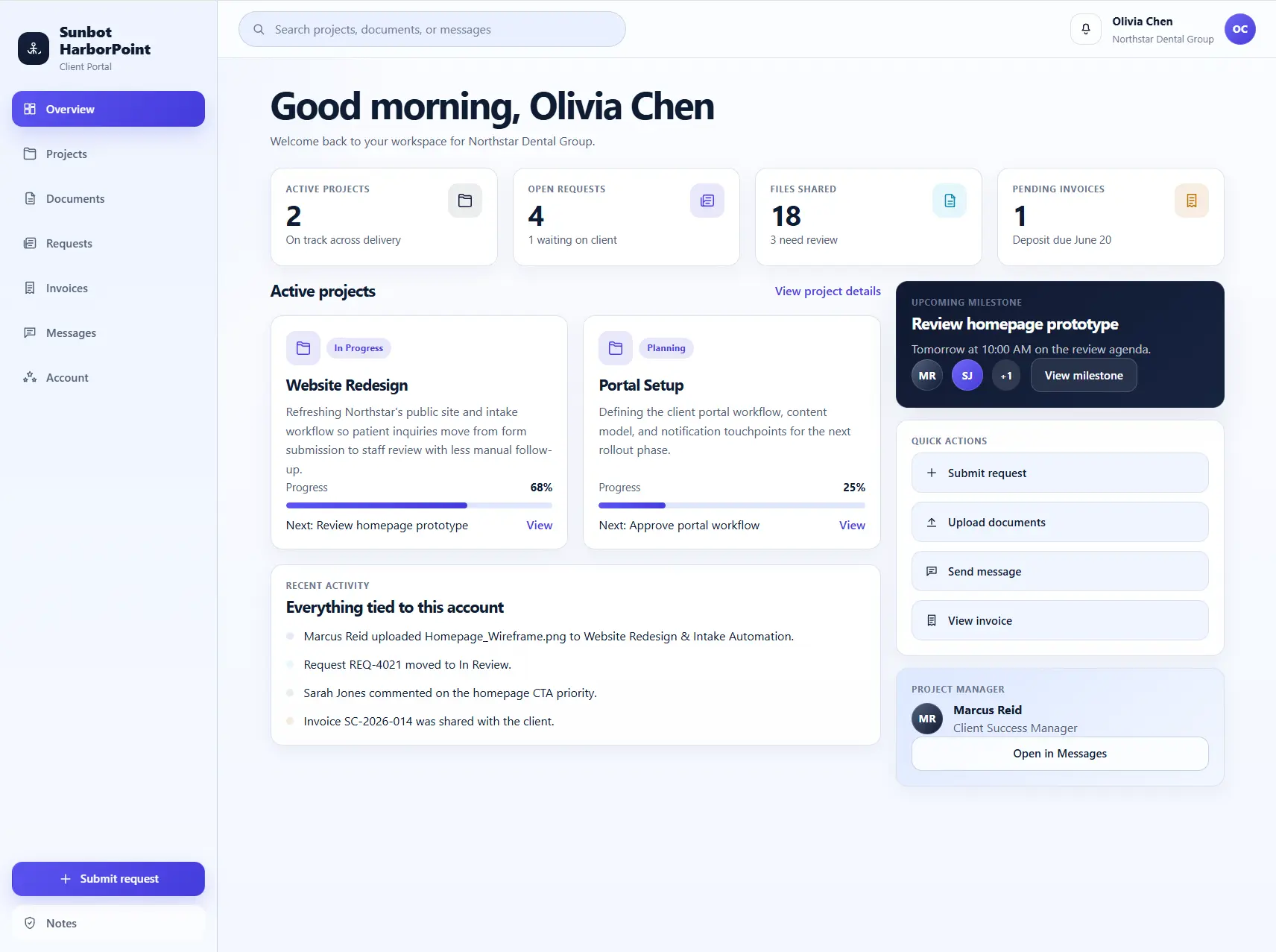
The client dashboard provides a concise account overview with active projects, open requests, shared files, pending invoices, recent activity, and quick actions.

  • Combines project progress, files, requests, invoices, and messages in one client view
  • Helps clients self-serve current information instead of relying on scattered emails

Request Tracking

The request-tracking view lets clients create, filter, and follow questions or change requests without relying on email threads.

  • Shows each request's project, status, priority, owner, update history, and next action
  • Supports request creation and status filtering so clients and staff share the same progress view

Invoice Centre

The invoice centre gives clients one place to review billing records, due dates, amounts, and current payment status alongside the related project.

  • Lists invoice number, related project, amount, issue date, due date, and payment status
  • Keeps billing progress visible without separating it from the wider client account

Client Message Centre

The message centre keeps project conversations, participants, timestamps, unread state, and replies together instead of splitting context across email threads.

  • Groups conversations by project with participant, timestamp, preview, and unread state
  • Keeps message composition and thread review within the account workflow

Staff Portal Dashboard

The staff workspace brings client activity, priority requests, files awaiting review, invoice status, and team workload into one operational view.

  • Summarizes client activity, open requests, files, invoices, and staff workload
  • Provides quick access to queues that need review or follow-up

Document Library

The document library organizes shared material by project, type, status, and update date, with a dedicated area for adding files to the relevant account.

  • Groups documents by project, category, status, and update date
  • Provides a structured alternative to manual file sharing through email

Mobile Client Portal

The mobile workspace prioritizes project status, open requests, shared files, invoices, messages, and quick actions for clients on smaller screens.

  • Prioritizes project status, new files, requests, invoices, and messages on mobile
  • Keeps client self-service actions readable without reproducing the full admin layout

Related project examples

Compare connected software workflows

For production use

Building something similar for your organization?

Sun Cluster builds secure customer portals for requests, documents, status, accounts, and communication.