
Sunbot Labs project · operations workflow

FlowOps Automation Dashboard

FlowOps organizes tasks, approvals, reminders, deadlines, ownership, and automation activity in one responsive operations workspace.

Product overview

FlowOps Automation Dashboard at a glance

A visual introduction to the main workflow, core features, and interface.

FlowOps Automation Dashboard at a glance poster

Project preview

Continue through the interface guide below to see how the workflow and key screens connect.

Operational work needs a shared queue

Service requests, quote approvals, invoice follow-ups, and internal tasks become difficult to coordinate when they are split across inboxes, spreadsheets, notes, and chat messages. FlowOps gives each item a visible status, owner, deadline, and next action.

What FlowOps brings together

The product experience connects an operations dashboard, task pipeline, approval queue, automation activity, productivity reporting, workflow settings, and a focused mobile overview.

Tasks, approvals, and automation visibility

  • Search and filter operational work by status, owner, source, priority, and deadline
  • Open task details to review context, assign ownership, send reminders, and update completion state
  • Route quote, expense, invoice, and workflow decisions through a dedicated approval queue
  • Review automation rules and recent activity alongside the work they support
  • Compare workload, overdue items, throughput, and workflow trends in reporting views
  • Keep urgent tasks and approvals accessible through a responsive mobile dashboard

Inside the application

An operations workspace built around action

A high-level workload view connects with task and approval queues, keeping ownership, deadlines, and decisions visible at each step.

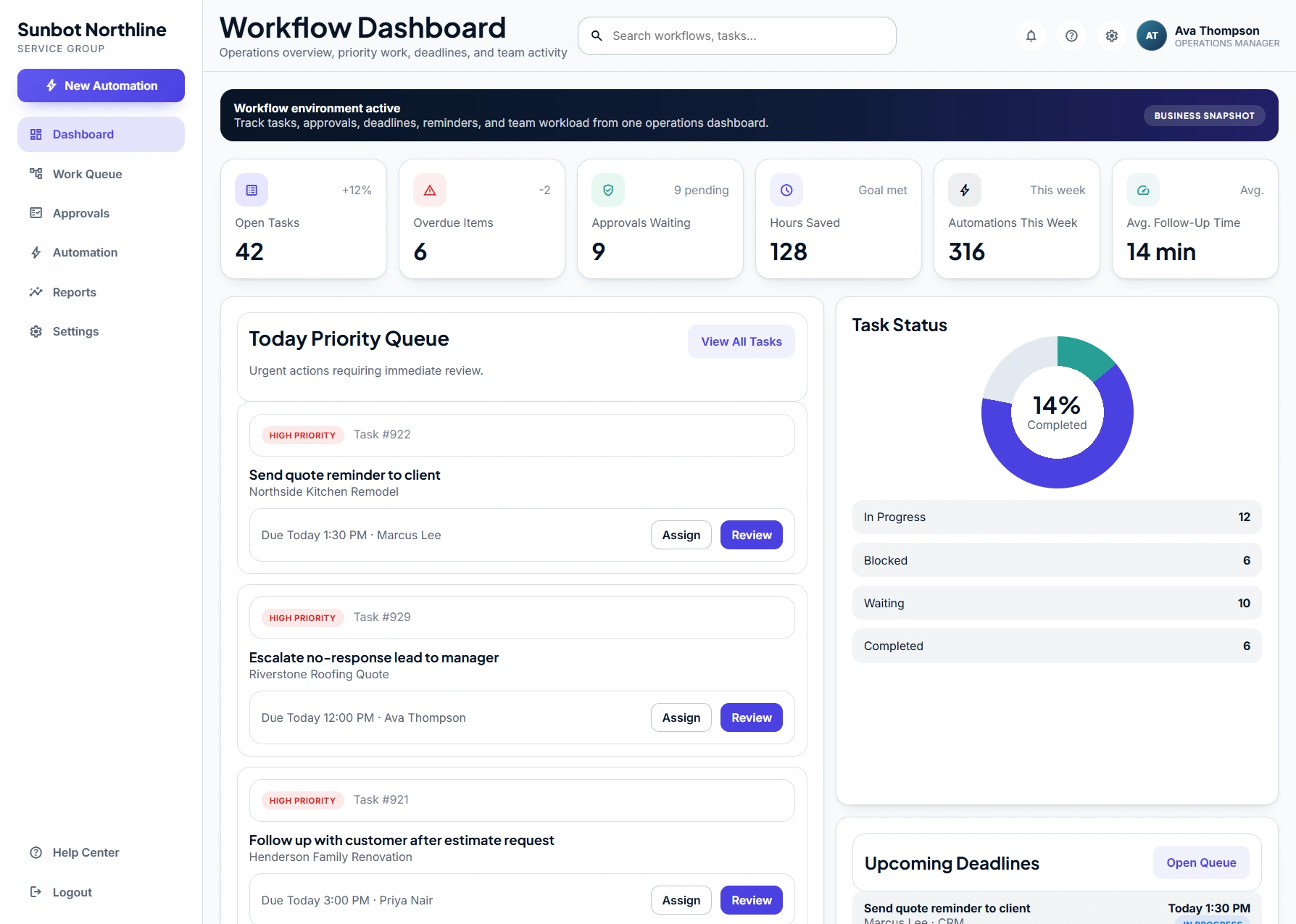
Workflow Operations Dashboard

The dashboard surfaces open work, overdue items, pending approvals, workload, and recent activity before an operator moves into a specific queue.

  • Summarizes open work, overdue items, approvals, workload, and recent activity
  • Gives operators one place to review priorities before opening individual tasks

Task Pipeline

The task pipeline groups work by status while preserving the owner, customer context, source, priority, and due date needed to decide what happens next.

  • Organizes tasks by status, owner, deadline, and operational priority
  • Supports search, filtering, assignment, reminders, and completion states

Approval Queue

The approval queue centralizes decisions that need review and presents the amount, impact, requester, activity history, and due time beside each request.

  • Centralizes pending quote, expense, invoice, and workflow approvals
  • Shows request context with approve and request-change actions

Mobile Operations Dashboard

The mobile dashboard prioritizes open tasks, overdue work, approvals, automation activity, and follow-up timing without shrinking the desktop workspace into a table.

  • Surfaces open tasks, overdue work, and recent automation activity on mobile
  • Keeps essential workflow navigation and priority actions within thumb reach

Related tutorials

Explore the ideas behind this project

Related project examples

Compare connected software workflows

For production use

Building something similar for your organization?

Sun Cluster develops operational dashboards around actions, ownership, alerts, and connected business data.