
Sunbot Labs project · automation planning

OpsValue AI Cost Saving

OpsValue helps teams document manual work, compare automation opportunities, test planning assumptions, and discuss priorities through clear operational views.

Product overview

OpsValue AI Cost Saving at a glance

A visual introduction to the main workflow, core features, and interface.

OpsValue AI Cost Saving at a glance poster

Project preview

Continue through the interface guide below to see how the workflow and key screens connect.

Automation planning needs shared assumptions

Teams may recognize repetitive administrative work without having a consistent way to compare effort, frequency, dependencies, implementation cost, and potential automation coverage. OpsValue turns those assumptions into a reviewable process inventory and prioritization workflow.

From process inventory to phased roadmap

The product experience connects an executive summary, ranked opportunity list, process audit, adjustable planning calculator, opportunity detail, phased roadmap, reports, settings, and responsive mobile views.

Compare opportunities before implementation

  • Inventory recurring work by department, task, frequency, time, and operational risk
  • Search and compare automation opportunities by priority, impact, effort, and dependency
  • Review current steps, proposed workflow changes, implementation considerations, and planning estimates
  • Adjust cost, frequency, task duration, coverage, and implementation assumptions in the calculator
  • Move selected opportunities into a phased 30/60/90-day roadmap
  • Review opportunity context and next steps from desktop and mobile layouts

Inside the application

Planning views from evidence to sequence

Process observations connect with ranked opportunities, adjustable assumptions, and a phased roadmap so each recommendation can be reviewed in context.

Executive Savings Dashboard

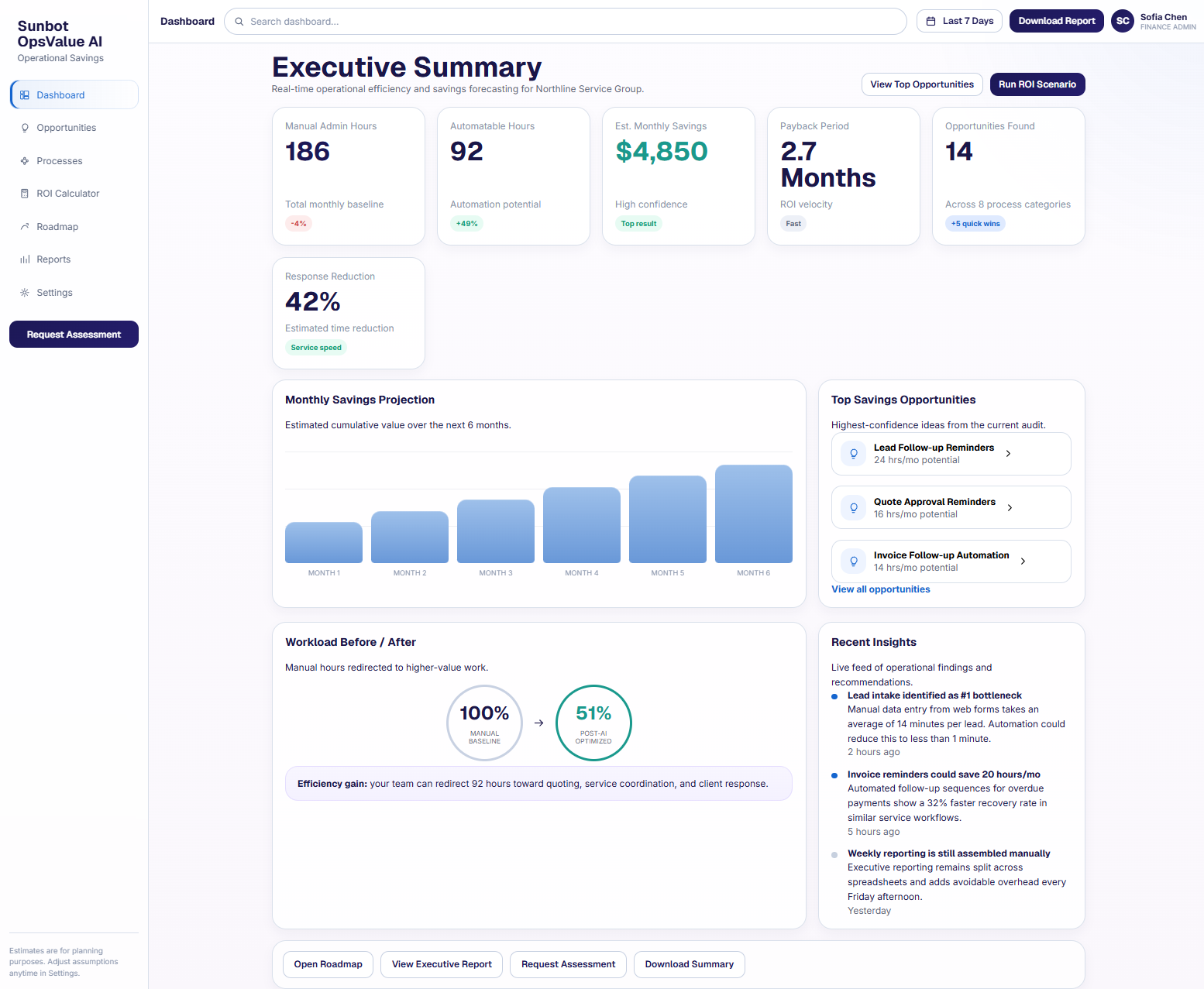
The executive dashboard summarizes documented manual effort, candidate opportunities, scenario estimates, and payback assumptions without separating the numbers from their planning context.

  • Summarizes estimated manual hours, scenario savings, payback, and top opportunities
  • Connects operational bottlenecks with a practical automation priority view

Automation Opportunities

The opportunity list gives managers a consistent way to compare proposed automations using impact, effort, hours, cost assumptions, and priority.

  • Ranks automation ideas by impact, effort, estimated savings, and priority score
  • Lets managers compare quick wins with larger workflow investments

Process Audit and Bottlenecks

The process audit identifies where repeated tasks consume time, records the source of operational friction, and links each bottleneck to a possible workflow change.

  • Breaks manual effort down by department and task category to make high-friction work easier to compare
  • Connects bottlenecks with candidate automation opportunities instead of presenting savings estimates without context

ROI Calculator

The planning calculator makes task frequency, labour cost, automation coverage, and implementation cost explicit so a scenario can be reviewed and revised.

  • Models hourly cost, task frequency, time per task, and expected automation coverage
  • Updates scenario savings and payback values as assumptions change

30/60/90-Day Automation Roadmap

The roadmap turns selected opportunities into a phased sequence of quick wins, core workflow work, reporting, and later optimization.

  • Groups proposed initiatives into phased 30, 60, and 90-day planning horizons
  • Shows priorities, dependencies, intended outcomes, and recommended next steps for each phase

Mobile Opportunity Detail

The mobile opportunity view keeps the workflow problem, proposed change, effort, assumptions, and recommended next step together.

  • Explains the pain point, proposed automation, effort, and expected savings on mobile
  • Keeps the recommended next step and key assumptions close to the estimate

Related tutorials

Explore the ideas behind this project

Related project examples

Compare connected software workflows

For production use

Building something similar for your organization?

Sun Cluster maps repetitive operations and builds production automation around clear rules and accountable exceptions.