
Sunbot Labs project · document operations

ExtractFlow AI Document Intake

ExtractFlow brings document intake, extracted-field review, exception handling, approval, and export preparation into one focused operations workspace.

Product overview

ExtractFlow AI Document Intake at a glance

A visual introduction to the main workflow, core features, and interface.

ExtractFlow AI Document Intake at a glance poster

Project preview

Continue through the interface guide below to see how the workflow and key screens connect.

A reviewable path from intake to export

Forms, invoices, and intake documents often require staff to locate important fields, identify missing information, correct uncertain values, and coordinate approval before data can move into another system. ExtractFlow gives that review work a visible sequence and a clear exception queue.

What ExtractFlow brings together

The application connects document intake, field previews, confidence and validation cues, a review queue, editable document details, approval actions, export preparation, settings, and responsive mobile review views.

Document review with exceptions kept visible

  • Move documents through intake and into a structured field-review workflow
  • Review extracted-field previews, confidence indicators, validation rules, and missing-information warnings
  • Filter the exception queue by review status and open the supporting document context
  • Correct fields, approve records, flag issues, or return work for another review
  • Prepare reviewed records for export and keep workflow history visible
  • Review priority exceptions from desktop and mobile layouts

Inside the application

From intake to reviewed record

Follow a document from initial intake through exception review and field-level approval, with a focused mobile queue for time-sensitive work.

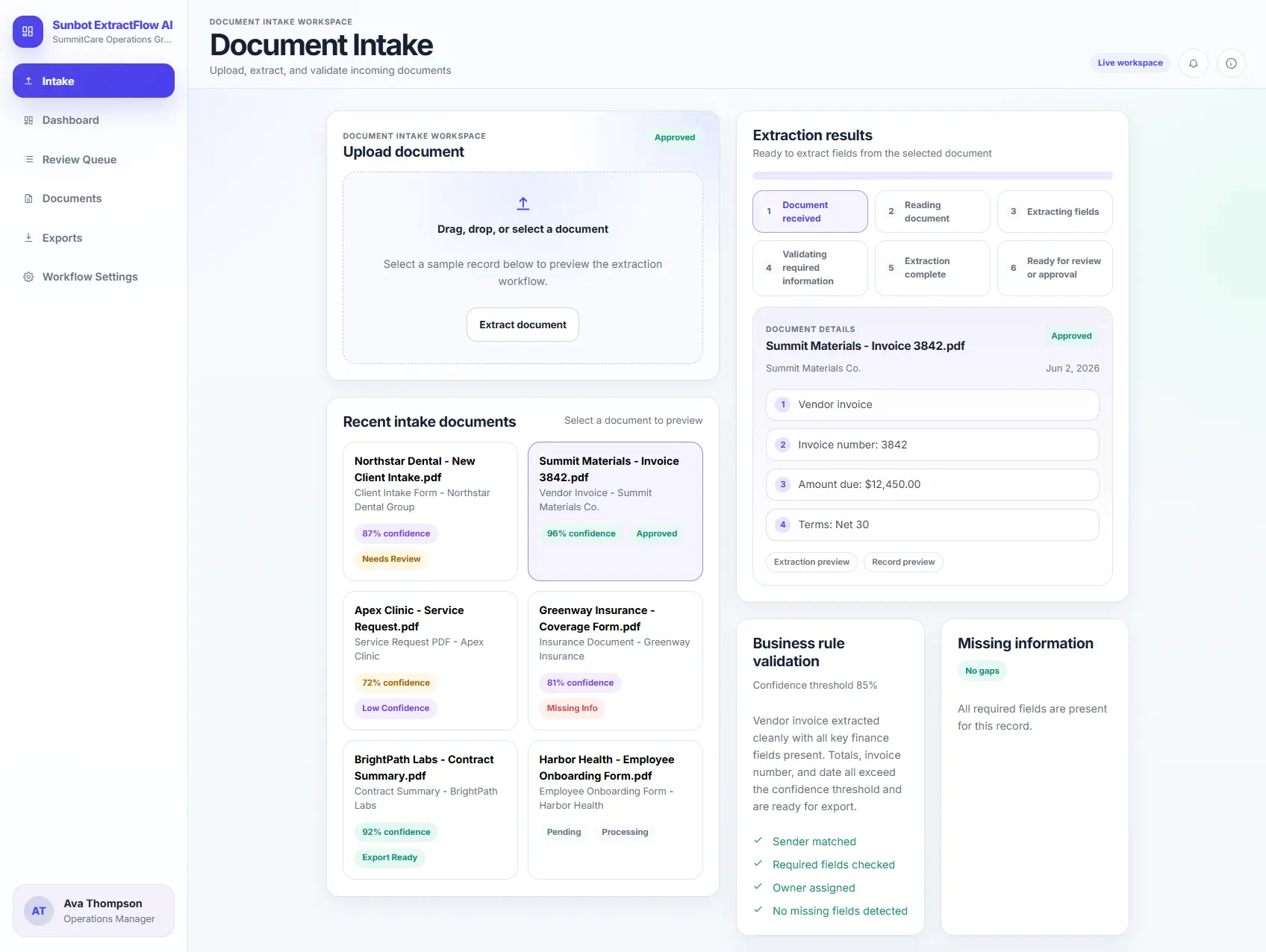
Document Intake Review

The intake workspace presents document selection, processing stages, extracted fields, validation rules, and missing-information checks in one guided view.

  • Walks through document selection, processing status, and extracted-field preview
  • Displays confidence scores and missing-information alerts before staff review

Exception Review Queue

The review queue separates approved records from documents that need attention because information is missing or confidence is low.

  • Groups records by review status, missing information, and low-confidence fields
  • Supports search, filtering, ownership, and quick access to document details

Extraction Review

The document workspace places source context beside editable fields so a reviewer can validate information, correct exceptions, and record an approval decision.

  • Pairs a document preview with editable extracted fields and per-field confidence
  • Supports approval, flagging, validation checks, and review routing from the same workspace

Mobile Document Review

The mobile queue condenses review status, confidence, and missing fields into cards that keep priority exceptions easy to scan.

  • Condenses exception status, confidence, and missing fields into a mobile review flow
  • Lets staff inspect and route records without reproducing a full desktop table

Related project examples

Compare connected software workflows

For production use

Building something similar for your organization?

Sun Cluster develops document and operations software with secure intake, review, integrations, and audit history.