
Sunbot Labs project · message operations

InboxPilot AI Triage

InboxPilot brings incoming messages into one review queue, adds structured triage context, and turns requests into owned follow-up work.

Product overview

InboxPilot AI Triage at a glance

A visual introduction to the main workflow, core features, and interface.

InboxPilot AI Triage at a glance poster

Project preview

Continue through the interface guide below to see how the workflow and key screens connect.

Incoming messages need consistent triage

Appointment, billing, insurance, cancellation, and urgent messages can arrive through several channels. Without a shared review process, important details are easy to miss and ownership remains unclear. InboxPilot organizes the intake queue around urgency, category, status, and next action.

From inbox intake to accountable follow-up

The application connects a triage dashboard, unified inbox, message analysis, owner assignment, follow-up tickets, routing rules, analytics, and responsive mobile review views.

Triage, routing, and review

  • Bring messages from several intake categories into one scannable queue
  • Filter by source, topic, urgency, sentiment, owner, and review status
  • Review a structured summary, intent, extracted details, and recommended routing context
  • Assign ownership, update review status, and create a follow-up ticket from the message workspace
  • Examine routing rules and workload indicators from the operations dashboard
  • Keep urgent messages and next actions readable on mobile

Inside the application

From shared inbox to owned next action

Queue-level workload and filtering lead into each message’s context, suggested routing, ownership, and follow-up decision.

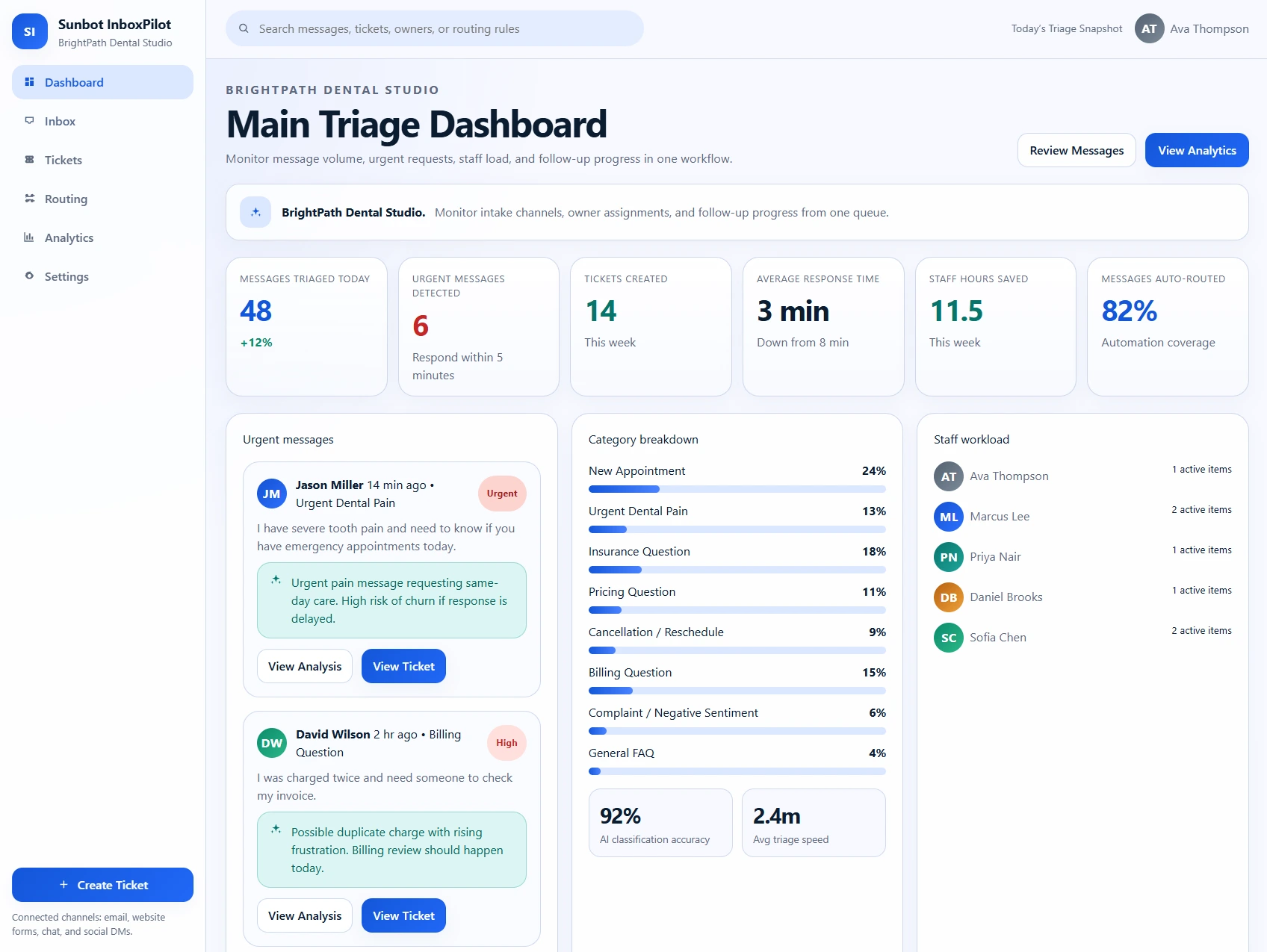
AI Triage Dashboard

The triage dashboard summarizes the incoming workload, urgent enquiries, owner activity, category mix, and follow-up tickets that need attention.

  • Summarizes message backlog, urgent enquiries, staff workload, and response performance
  • Makes classification patterns and recent triage activity visible to managers

Unified Message Inbox

The unified inbox combines messages from several intake sources and keeps category, urgency, sentiment, owner, and status visible in the queue.

  • Combines email, web form, chat, social media, and messaging enquiries in one queue
  • Filters messages by source, category, urgency, sentiment, owner, and status

Message Analysis

The message workspace places customer context, extracted details, urgency, routing guidance, and the recommended next action beside the original enquiry.

  • Shows summary, intent, topic, sentiment, urgency, and extracted details
  • Suggests routing, ownership, response context, and ticket or follow-up actions

Mobile Triage Queue

The mobile queue turns a wide inbox table into a focused filtering and review flow suited to smaller screens.

  • Keeps urgent messages, ownership, category, and next action scannable on mobile
  • Supports filtering and review without showing an oversized desktop table

Related tutorials

Explore the ideas behind this project

Related project examples

Compare connected software workflows

For production use

Building something similar for your organization?

Sun Cluster develops assisted intake, triage, routing, and human-review workflows for customer operations.