
Sunbot Labs project · customer support

AssistFlow AI Support

AssistFlow pairs a guided customer conversation with the staff context needed to review requests, capture leads, create tickets, and manage human follow-up.

Product overview

AssistFlow AI Support at a glance

A visual introduction to the main workflow, core features, and interface.

AssistFlow AI Support at a glance poster

Project preview

Continue through the interface guide below to see how the workflow and key screens connect.

Support requests need a controlled handoff

Service questions, appointment requests, insurance enquiries, and urgent concerns can arrive at any time. A useful support workflow must give customers a clear response while preserving the context, urgency, and contact details staff need when a person should take over.

Customer conversations and staff follow-up

AssistFlow connects a customer-facing chat experience with staff dashboards, conversation detail, lead and ticket queues, knowledge content, assistant settings, analytics views, and a responsive mobile conversation flow.

A connected support experience

  • Guide customers through common service, pricing, policy, and appointment questions
  • Collect contact details when a request requires booking or staff follow-up
  • Escalate urgent or unresolved conversations with the relevant transcript and customer context
  • Review conversation summaries, intent, urgency, next actions, leads, and tickets from the staff workspace
  • Organize approved support knowledge and assistant configuration in dedicated views
  • Carry the customer conversation and staff overview into responsive mobile layouts

Inside the application

From customer question to staff action

Customer conversations connect directly with the operational views staff use to review urgency, understand context, and continue the interaction.

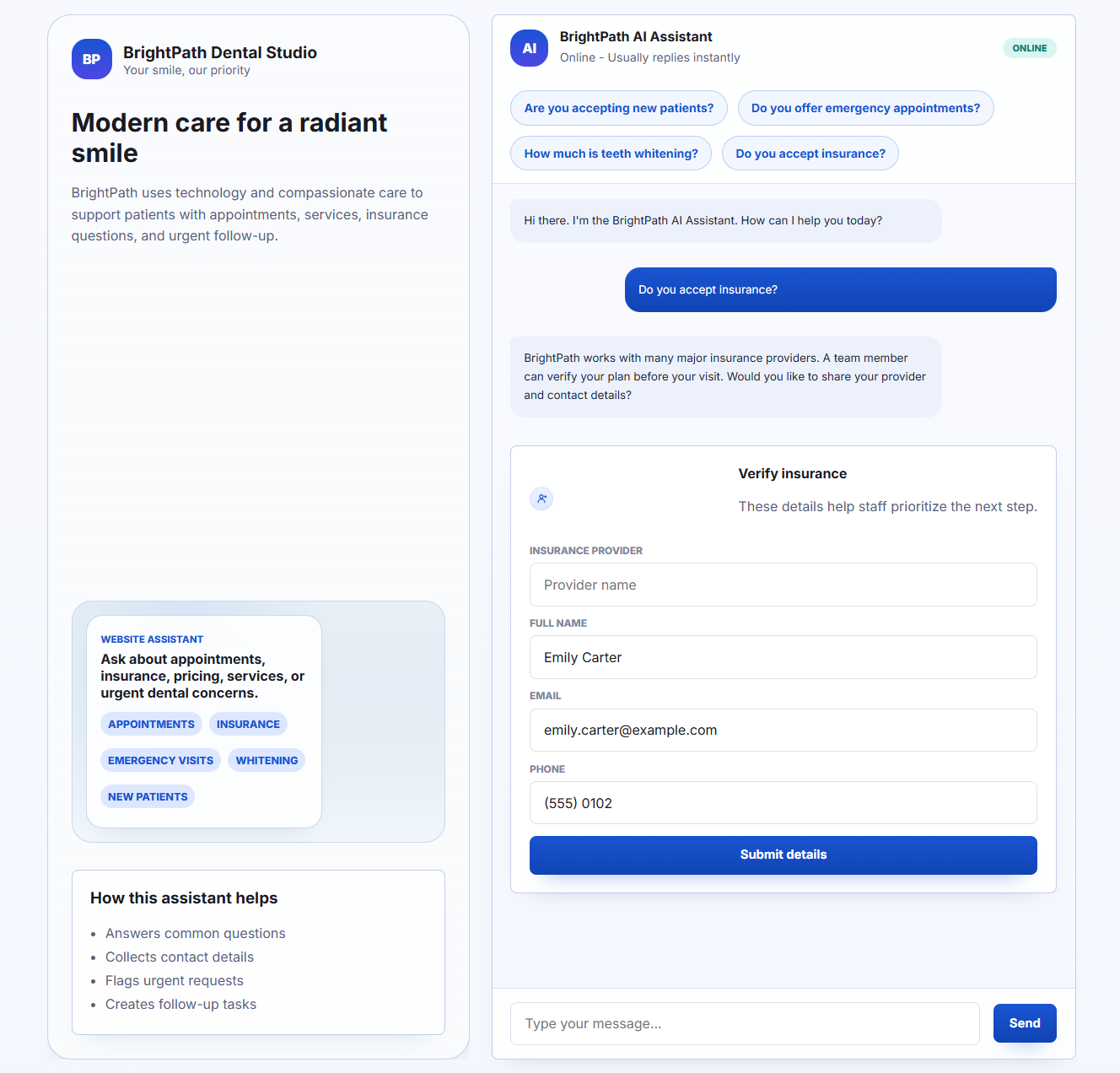
Customer Chat Experience

The customer chat combines suggested questions, clear responses, and structured contact capture so a service request can move into staff follow-up with useful context.

  • Presents guided service, pricing, and policy responses
  • Connects lead capture, service recommendations, handoff, and ticket creation

Support Dashboard

The staff dashboard brings active conversations, urgent requests, captured leads, recent tickets, and follow-up work into one operational view.

  • Summarizes active conversations, new leads, urgent requests, and follow-up tickets
  • Provides staff visibility into recent conversation activity and follow-up status

Conversation Intelligence

The conversation workspace combines the transcript with a concise summary, intent, urgency, customer details, and the recommended next action.

  • Combines the transcript with summary, intent, sentiment, and urgency context
  • Highlights customer details, recommended next actions, and handoff context

Mobile Support Chat

The mobile experience keeps suggested questions, conversation context, contact capture, and escalation steps clear on a narrow screen.

  • Keeps suggested prompts, messages, and customer actions clear on narrow screens
  • Carries the same lead-capture and escalation journey into the mobile layout

Related project examples

Compare connected software workflows

For production use

Building something similar for your organization?

Sun Cluster builds AI-assisted support workflows with controlled knowledge, human handoff, and connected customer records.