
Sunbot Labs project · voice support

CallPilot AI Voice Support

CallPilot brings caller context, conversation summaries, urgency, callback work, and staff follow-up into one voice-support workspace.

Product overview

CallPilot AI Voice Support at a glance

A visual introduction to the main workflow, core features, and interface.

CallPilot AI Voice Support at a glance poster

Project preview

Continue through the interface guide below to see how the workflow and key screens connect.

Missed calls create fragmented follow-up

Missed calls, repeated questions, incomplete notes, after-hours enquiries, and urgent requests can leave staff without a reliable follow-up record. CallPilot organizes each voice interaction into a clear summary and an owned callback or ticket workflow.

Voice support context in one workspace

The product experience connects a voice interaction workspace, live transcript view, staff dashboard, searchable call history, call detail, callback and ticket queues, agent configuration, analytics, and mobile layouts.

From caller intent to staff action

  • Follow a voice-support interaction with visible transcript progress
  • Review caller intent, urgency, extracted details, summary, and recommended next action
  • Convert an interaction into a callback, ticket, or human-escalation workflow
  • Search call history and open the full transcript and follow-up context
  • Review greeting, business-hours, escalation, knowledge, tone, and voice configuration
  • Keep active call context and follow-up queues readable on desktop and mobile

Inside the application

A voice interaction connected to follow-up

The active interaction connects with staff views for reviewing calls, understanding urgency, and creating the next callback or ticket.

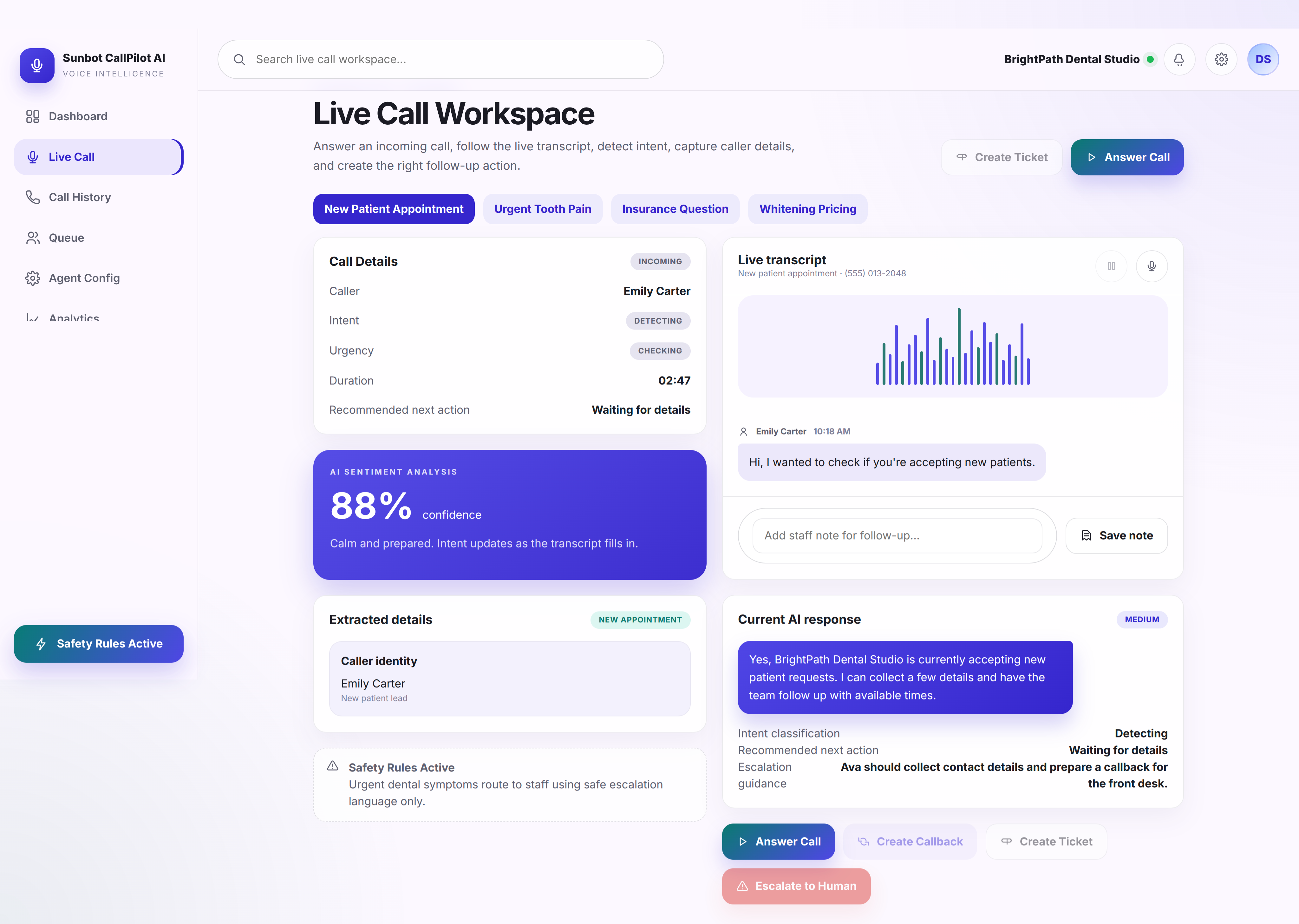
Voice Interaction Workspace

The voice workspace keeps transcript progress, caller intent, urgency, extracted details, and the recommended next action visible during the interaction flow.

  • Reveals the transcript alongside caller intent and urgency state
  • Connects the interaction to callback, ticket, and human-escalation actions

Voice Support Dashboard

The staff dashboard summarizes recent calls, urgent requests, callback work, conversation summaries, and the queue that needs human attention.

  • Summarizes handled calls, missed-call recovery, callbacks, and response timing
  • Surfaces urgent calls, recent AI summaries, and staff follow-up work

Call Detail and Summary

The call detail view combines caller information, transcript, intent, urgency, extracted details, interaction history, and follow-up context in one record.

  • Combines caller details, transcript, intent, urgency, sentiment, and extracted information
  • Shows the recommended next action with a related ticket or callback record

Mobile Voice Workspace

The mobile workspace keeps transcript progress, caller context, voice state, and the escalation path readable during a narrow-screen workflow.

  • Keeps transcript progress, caller context, and voice state readable on mobile
  • Provides clear controls for starting, pausing, and escalating the interaction

Related tutorials

Explore the ideas behind this project

Related project examples

Compare connected software workflows

For production use

Building something similar for your organization?

Sun Cluster builds AI-assisted support and booking workflows with human follow-up, connected records, and operational review.