
Is role-based access control enough?
It is a useful foundation, but many applications also need ownership, account, department, or state conditions. Those relationships can be expressed alongside roles.
Web Apps & Software
Create an access and workflow model that explains who can see a record, which actions are allowed, and how each state change is enforced.

How the workflow connects
A requirement such as “admins can manage requests” leaves important questions unanswered. Which requests can they see? Can they edit submitted information? Can they approve their own work? What happens after the request closes? A permission matrix tied to status transitions answers those questions before code and interface behaviour diverge.
Use rows for actions such as view, create, assign, edit, approve, export, and delete. Use columns for roles or record relationships such as requester, assigned operator, manager, and auditor. Add conditions where access depends on ownership, department, account, or state.
This format exposes conflicts. For example, a manager may approve records from the department but not a request they submitted themselves.
An action can be valid in one state and invalid in another. A requester may edit a draft but only comment after submission. An operator may close a request only after required completion fields are present. Each transition should name the current state, action, actor condition, required data, and resulting state.
Hiding a button improves usability but does not prevent a direct API request. The server must evaluate identity, relationship, current record state, and requested action. Background jobs and integrations need their own identities and narrowly scoped permissions as well.
Test cross-account access, stale browser state, reassignment, archived records, exported data, and revoked users. Include attempts that should fail and confirm that denial does not disclose sensitive record details. Permission tests are most useful when they follow the same workflows as normal acceptance tests.
Suppose a portal has customers, service staff, managers, and finance users. A page-based rule such as managers can access invoices is not precise enough. The important actions are view invoice summary, open invoice detail, download a document, record a payment status, issue an adjustment, and export financial data. Each action may have a different scope and condition.
Write permissions using actor, action, record scope, state condition, and field restrictions. A service employee might view invoices for assigned accounts but not export them. A customer can download their own issued invoice but cannot see internal notes. A finance user can correct payment status only when the record is not locked by reconciliation.
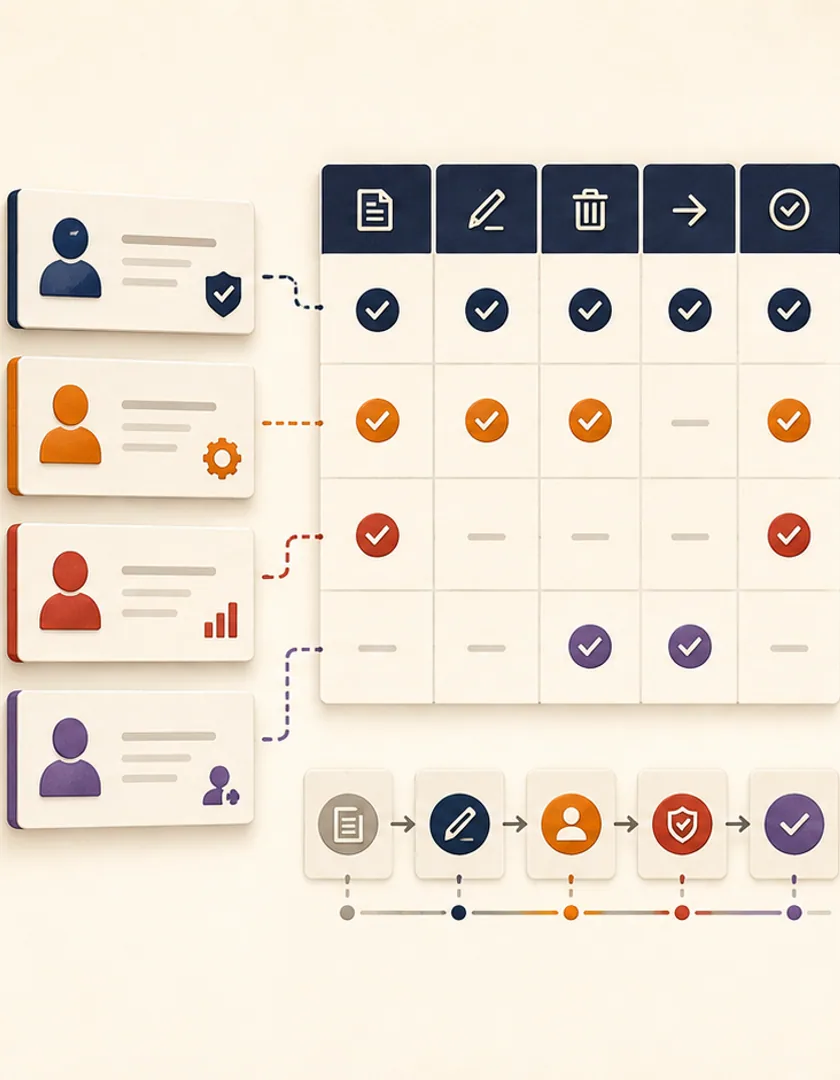
| Role | Action | Record scope | State or field condition |
|---|---|---|---|
| Customer | View and download invoice | Own account | Issued customer fields only |
| Service staff | View invoice status | Assigned accounts | No financial export |
| Manager | Approve adjustment | Department accounts | Pending approval only |
| Finance | Correct payment status | All permitted accounts | Not locked by reconciliation |
Hiding a button is useful interface guidance, but it is not authorization. Every API or server action must verify the signed-in identity, current role or policy, record scope, and current state. Recheck these facts when the action occurs because another user may have changed the record after the page loaded.
Record consequential decisions such as approval, access grant, export, reassignment, and override with actor, time, record version, and relevant reason. Test cross-account access, guessed identifiers, stale pages, removed roles, bulk actions, and direct API calls. Permission tests should prove both that authorized work succeeds and that near-miss cases fail without revealing protected information.

Visual guide
A visible control is only the first layer; the server must authorize the current action against the current record.
Interface guidance
Show actions the person can reasonably use and explain unavailable states.
Authenticated identity
Establish who is making the request and whether the session remains valid.
Role or policy
Check the permitted action, not only access to the page.
Record scope
Confirm tenant, account, assignment, or ownership boundaries.
Current state
Reject stale actions that no longer apply to the record.
Audit evidence
Retain actor, decision, version, time, and reason where needed.
Practical questions
It is a useful foundation, but many applications also need ownership, account, department, or state conditions. Those relationships can be expressed alongside roles.
Security-sensitive or unusual denials are valuable to log. High-volume expected denials may need sampling or structured monitoring so logs remain useful and privacy rules are respected.
Continue exploring
Work with Sun Cluster
Sun Cluster builds custom web applications with server-enforced access, workflow rules, and role-specific interfaces.