Websites & Commerce

Choosing Systems of Record for Products, Inventory, and Orders

Define which commerce system owns each type of data before connecting a storefront to inventory, fulfilment, accounting, or customer tools.

By Sunbot Labs

Updated

5 min read

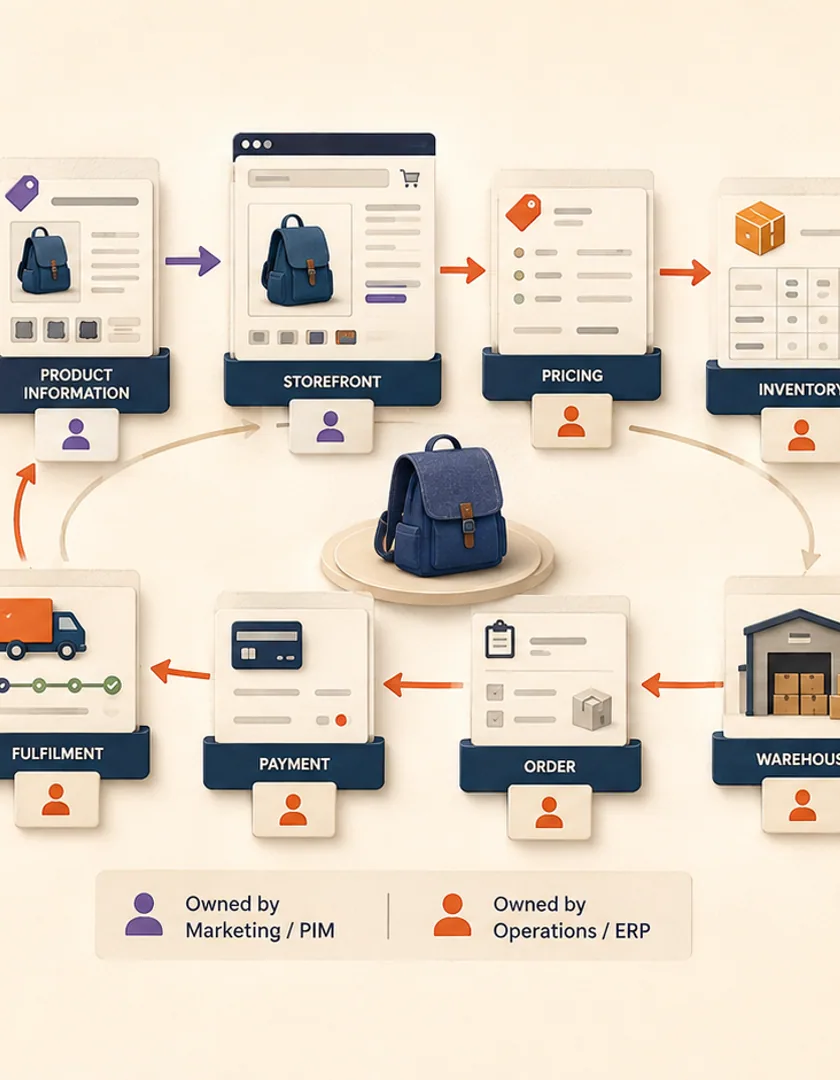
Product, pricing, inventory, order, payment, warehouse, and fulfilment systems connected through explicit data ownership.

How the workflow connects

  1. 1Inventory every shared field
  2. 2Assign one authoritative source
  3. 3Define update direction and timing
  4. 4Record conflicts and rejected changes
  5. 5Reconcile on a scheduled basis

A connected store may show product information from a catalogue tool, quantities from an inventory system, payment state from a provider, and fulfilment state from a warehouse. Integration problems often begin when two systems are allowed to edit the same fact without a rule for authority.

Create a data ownership table

List product names, descriptions, prices, tax rules, available quantity, reserved quantity, order status, payment status, shipment tracking, and customer identifiers. For each item, name the authoritative system, permitted editors, downstream consumers, and acceptable delay.

The answer does not have to be one platform for everything. A product information system may own descriptions while an ERP owns stock and the commerce platform owns the checkout session.

Distinguish commands from reported facts

A request to fulfil an order is a command. A warehouse confirmation that a parcel shipped is a reported fact. Treating the request as proof of shipment creates premature customer messages and inaccurate status. Store both events and advance the public state only when the responsible system confirms it.

Define conflict rules before synchronization

Conflicts occur when a product is edited in two tools, a refund is issued outside the store, or stock changes while an order is being placed. Decide whether the integration rejects, queues, merges, or flags each conflict. Silent last-write-wins behaviour is rarely safe for financial or inventory data.

  • Keep source identifiers and update versions
  • Log rejected or transformed updates
  • Make manual overrides visible
  • Define who resolves ownership disputes

Add reconciliation as a normal operation

Events and API calls can be missed or delayed. A scheduled comparison can identify orders with mismatched totals, shipments with missing tracking, or inventory that differs beyond an accepted threshold. Reconciliation should create actionable records rather than only a technical log entry.

Map one product across the commerce operation

A product can have marketing copy in the commerce platform, cost and purchasing details in an ERP, available quantities in a warehouse system, and channel-specific listing identifiers in a marketplace. Calling all of these records the product hides the ownership question. Give the shared item an internal identity, then map each system's record and the fields it is allowed to control.

For example, the ERP may own the base SKU and purchasing status, the commerce platform may own customer-facing copy, and the warehouse may own available-to-promise quantity. A marketplace price can be a derived channel value rather than an authority. These decisions let an integration reject or review conflicting updates instead of using the last timestamp as truth.

One product record moving through commerce systems with authoritative owners for each important field.
Illustrative ownership map for product, inventory, and order information.
DataPossible authorityConsumersImportant rule
SKU identityERP or product systemStorefront, warehouse, marketplacesNever match solely by title
Sellable copyCommerce platformStorefront and feedsPreserve channel overrides intentionally
Available quantityWarehouse or inventory serviceStorefront and marketplacesDefine reservation timing
Order stateOrder-management workflowCustomer service, fulfilment, accountingRetain source events and transitions
Payment statePayment providerOrder workflow and accountingDo not infer from order status

Plan migration and daily operations together

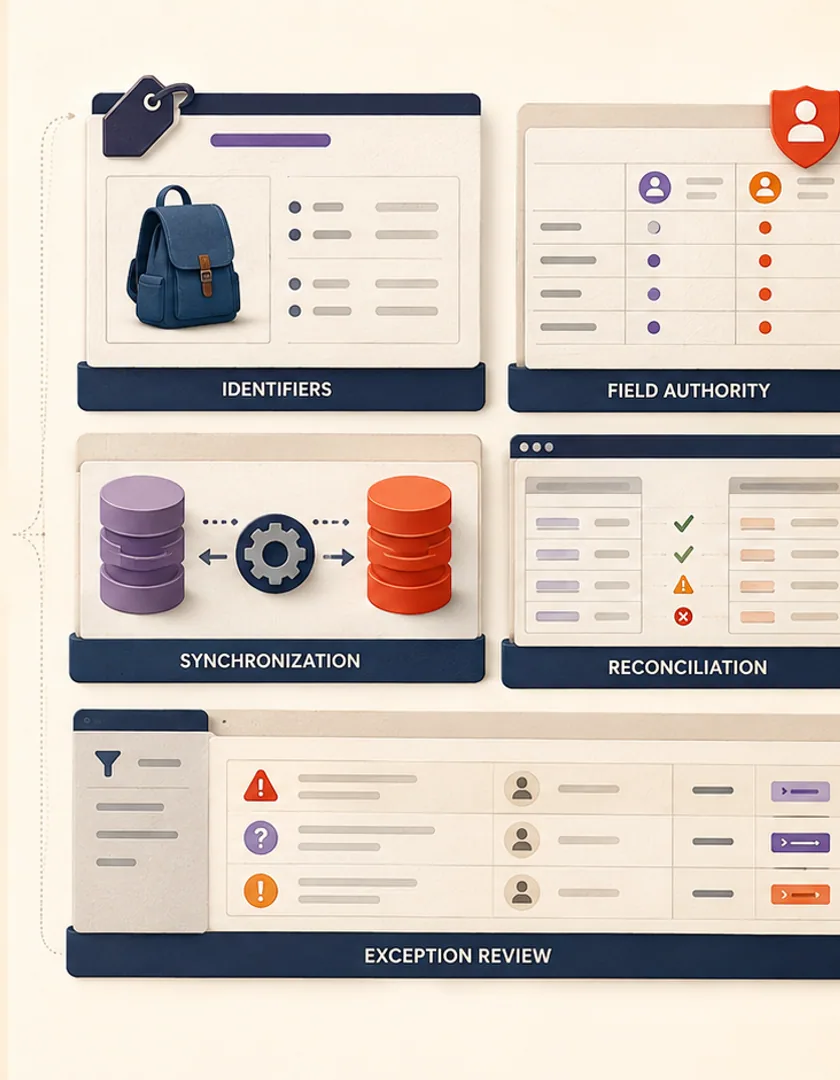
Before switching an integration on, reconcile identifiers, duplicates, archived products, open orders, unfulfilled quantities, refunds, and channel listings. A migration report should show records that matched confidently, records created, conflicts requiring review, and items intentionally excluded. Keep the source snapshot and transformation version so corrections can be traced.

After launch, provide views for unmapped products, negative or stale inventory, orders stuck between states, rejected updates, and reconciliation differences. Name the team that can resolve each category. The integration is not finished when the first sync succeeds; it is operational when routine discrepancies can be understood and corrected without editing databases by hand.


Migration identifiers, synchronization, reconciliation, and exception review supporting daily commerce operations.

Visual guide

Commerce records and their operating boundaries

Each system owns a limited part of the commercial record and publishes confirmed facts to the others.

  1. 1

    Product authority

    Stable identity, purchasing status, and shared attributes.

  2. 2

    Commerce experience

    Customer copy, merchandising, collections, and channel presentation.

  3. 3

    Inventory authority

    On-hand, reserved, available, and location-specific quantities.

  4. 4

    Order workflow

    Customer request, state transitions, exceptions, and fulfilment coordination.

  5. 5

    Payment authority

    Authorization, capture, settlement, refund, and dispute facts.

  6. 6

    Reconciliation

    Routine comparison of identifiers, quantities, and open states.

A system-of-record map makes ownership explicit before connectors begin moving data.

Practical questions

Questions that often come up

Can the commerce platform be the system of record for everything?

It can for a simple operation. As fulfilment, accounting, catalogue, or inventory responsibilities move elsewhere, ownership should follow the system that performs and confirms the work.

Is real-time synchronization always necessary?

No. Timing should match the operational consequence. Checkout inventory may need fast updates, while descriptive catalogue data can often tolerate scheduled synchronization.

Work with Sun Cluster

Planning a similar system for your organization?

Sun Cluster connects storefronts with the business systems that own catalogue, inventory, order, and fulfilment data.